Overview
AllScripts Requisitioning is part of the UCSF Health Finance suite of UCSF financial applications, which is hosted and supported by UCSF. This application is accessed via the virtual Citrix application published on your UCSFMC computer Start Menu.
AllScripts Requisitioning is part of the UCSF Health Finance suite of UCSF financial applications, which is hosted and supported by UCSF. This application is accessed via the virtual Citrix application published on your UCSFMC computer Start Menu.
Prerequisites
- UCSF network credentials
A member of the correct PMM Citrix access group
NOTE: Access is requested via https://arf.ucsfmedicalcenter.org/ . Select PMM on the form. Use BCH Oakland as the HOST NAME in the form. Please ignore the "Host was NOT found in the system!" message. The PMM software is available as a virtual application at BCH Oakland, therefore the computer name is not needed to install the application.
Launch AllScripts Requisitioning
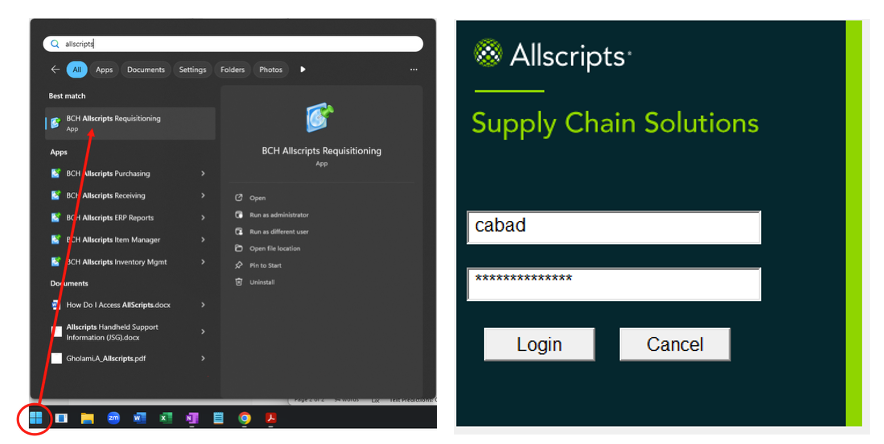
- Click on the Start menu.
- Type AllScripts.
- Select BCH AllScripts Requisitioning. NOTE: This may take a moment while Citrix is launching.
- Log into AllScripts using your AllScripts login credentials.
If you encounter any issues accessing AllScripts, please call the IT Service Desk at 415-514-4100.