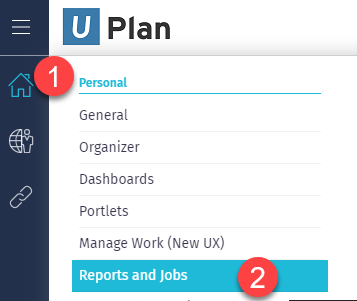
In this article In this article Get more guidance Related information Environment: Classic Process: Hover over the Home Icon on the left navigator Select Reports and Jobs Service Category Business Applications Owner Team IT Project Management Office Service MyPPM Get more guidance Explore step-by-step how-to guides and tips to make the most of this IT service. Health IT Effort Tracking Tip Sheet MyPPM: Project Closure Process MyPPM: Reporting MyPPM: Reset Smartsheet Integration MyPPM: Review Allocations MyPPM: Smartsheet Integration MyPPM: Smartsheet Integration - Tips and Tricks MyPPM: Smartsheet - Create from Clarity and Link MyPPM: Smartsheet Admin - Create Sheet from Template and Link MyPPM: Status Reports MyPPM: Smartsheet Integration - End User MyPPM: Resource Manager - Submit Timesheets for Resources MyPPM: Allocations By Resource MyPPM: Creating and Managing Hierarchies MyPPM: Additional Features MyPPM: Allocations By Investment MyPPM Effort Tracking Tip Sheet MyPPM: Idea Intake MyPPM: Idea Management MyPPM: Create Idea from Template MyPPM for Idea Management MyPPM: Roadmaps MyPPM: Mobile Timesheet App MyPPM: Create and Manage Picklist MyPPM: Project Financials MyPPM for Project Team Members MyPPM: Create and Manage Views MyPPM: OKR - Tiered Goal Deployment MyPPM: OKR Enterprise Portfolio Dashboard - Technology Investment MyPPM: OKR - Tier 3 and 4 Dashboards MyPPM: OKR - Tableau Reporting Guide Create and Edit Tier Data MyPPM: OKR - FY Leadership Planning MyPPM: Timesheet Tracking for Resource Managers Tip Sheet MyPPM Allocation Snapshot MyPPM for Resource Managers MyPPM Resource Mangers: Capacity and Demand - Resource Workloads MyPPM Manual Timesheet Approval Process MyPPM for Resource Managers: Review Timesheet Reports MyPPM: Using a Shared View MyPPM for PMs & RMs: Check Allocations & ETC MyPPM for Project Managers: Create Risks / Issues / Decisions and Changes MyPPM: Top Things to do in MyPPM MyPPMs for Admins MyPPM for PMs: Closeout a Project MyPPM for PMs: Create a Status Update MyPPM for PMs & RMs: Add Project Details & Chartstrings MyPPM FAQs MyPPM for Project Managers MyPPM for Resource Managers: Assign or Replace Resources MyPPM for Resource Managers: View Resource Allocations MyPPM for Project Managers: Request Resources MyPPM: Add Time Off to Your Calendar MyPPM for Project Managers: Add Tasks MyPPM: View Tasks MyPPM: Complete Your Timesheet MyPPM: Login, New UX and Home Menu Related information MyPPM for Resource Managers: View Resource Allocations MyPPM for Resource Managers: Assign or Replace Resources Notice an error on this page? Send Feedback