Overview
Categorized frequently-asked questions for the Digital Accessibility Compliance Project
Frequently Asked Questions for the Digital Accessibility Compliance Project.
Requirements and Scope | Websites | Applications | PDFs, PowerPoint, Word, Videos, and Course Content | Inventory | Procurement | Training and Getting Help
Requirements and Scope
Technical Standards
- What is accessibility? What does it mean to make something accessible? Read our brief introduction to accessibility, with examples.
- What level of WCAG conformance is required? The law specifies WCAG 2.1 Level A and AA. Level AAA (Triple A) is not applicable.
Scope
- What has to be made accessible? All websites, web and mobile applications, digital documents (e.g., PDF, Word, PowerPoint), video and audio, social media, forms, tables, maps, and course content are in scope.
- Do network-restricted or password-protected websites and applications have to comply? Yes.
- Do PDFs emailed or shared in MyChart with UCSF patients have to comply? Yes.
- Do mobile apps used by UCSF patients or staff have to comply? Yes.
- Do vendor applications and third-party content like training materials have to comply? Yes. This includes vendor applications and mobile apps such as Epic and MyChart, vendor search engines embedded in UCSF websites, and content created by others used for UCSF business, teaching, care delivery, or research.
Risk-Based Approach
- Where should I start? How should I prioritize my efforts? We recommend following the US Department of Justice’s recommendations to prioritize high-volume, public-facing website, applications, PDFs, and videos first.
Responsibilities
I own a website, application, or other content covered by the new rules. What are my responsibilities?
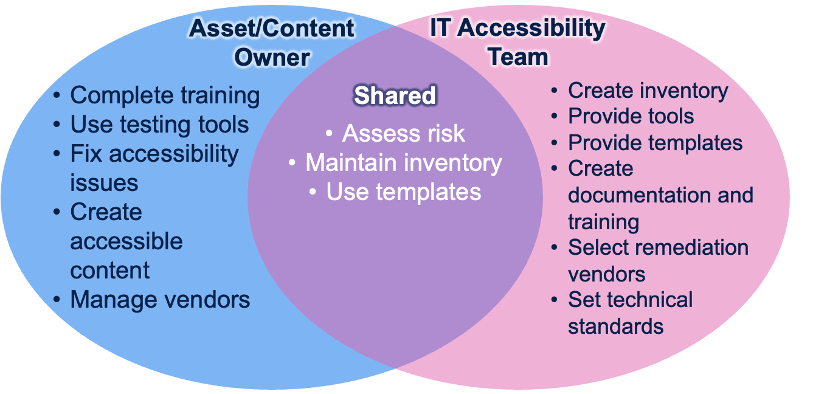
- You are responsible for completing accessibility training appropriate for their role, including training on relevant testing tools like Siteimprove. You should use those testing tools to identify and fix accessibility issues and create accessible content.
- If you work with vendors, make sure they are aware of our accessibility requirements, and that they’re products and services meet these requirements.
- Try our Leader Tool Kit and inventory to track your websites, applications, and other content so you know what your risk is.
- And always use accessible templates when creating websites and documents – the UCSF Brand Identity website is a great source for accessible templates.
Deadlines
When is the deadline? The U.S. Department of Health and Human Services announced an extension of the Section 504 digital accessibility compliance deadline from May 2026 to May 11, 2027, aligning more closely with the previously extended ADA Title II timeline from April 2026 to April 26, 2027. Although enforcement under these regulations has been delayed one year, the intent is to provide additional time for institutions to complete the work required to meet these standards.
In alignment with these federal changes, UC will update elements of the IT Accessibility Policy (ITAP) where policy requirements directly correspond to federal compliance timelines. Requirements tied to federal regulations will reflect the updated deadlines. At the same time, UC-specific programmatic expectations and operational requirements remain in effect, and locations are expected to continue making measurable progress under the current policy.
What this means for UC:
- Expectations for progress remain unchanged. UC’s IT Accessibility Policy (ITAP) remains in effect and continues to set expectations for digital accessibility across the University.
- This additional time should be used to advance digital accessibility efforts and mature location ITAP Programs, not defer work.
- WCAG 2.1 Level AA remains the governing technical accessibility standard under the policy.
- Continued focus on high-impact content and services, in accordance with the ITAP Prioritization Plan elements (ITAP Section V.C.6), remains essential.
Across UC, locations have already laid important groundwork and built meaningful momentum. This next phase is an opportunity to reinforce that foundation, embedding accessibility more consistently into how digital content and services are created, maintained, and delivered.
By continuing this work, UC is honoring both the intent of the federal extensions and the University’s longstanding commitment to equitable access and inclusion.
Exceptions
Are there exceptions? Yes. The ADA Title II Rule includes a limited number of narrow exceptions. Most digital content is still required to be accessible.
For more information about the exceptions:
- If my website isn't hosted by UCSF, do I still need to make it digitally accessible? Yes. Accessibility requirements are based on the content and services being provided, not where the website is hosted. Refer to the UCOP Digital Accessibility FAQs for additional guidance.
- Who can answer questions about exceptions? If you have questions about whether your content may qualify for an exception, contact:
- UCSF Campus contact:
- Cecile Puretz, ADA/504 Compliance Officer, [email protected]
- Office for the Prevention of Harassment and Discrimination
- UCSF Health contact:
- Rachel Nosowsky, Chief Health Counsel, [email protected]
- Office of Legal Affairs
- Additional resources:
- Note: UCOP's monthly Digital Accessibility Office Hours concluded in April 2026. Recordings and related materials are available on the UCOP Digital Accessibility Resources page.
- UCSF Campus contact:
- Does an approved exception expire?
- Yes. Initial exceptions are approved for a two-year duration. Renewals for exceptions are required every two years thereafter. Throughout the initial two-year exception period, the individual(s) responsible for Exceptions Coordination, or their Designee, must regularly communicate with the department that was granted an exception to ensure there is meaningful progress toward making the excepted IT Accessible via a remediation plan, as described in the Policy, Section V.C.4.c.
- Source: UCOP's Accessibility Frequently Asked Questions #13
Websites
Automated Assessment Tool: Siteimprove
- Why can't I see the websites I am responsible for within Siteimprove?
- New User: You will need to sign up for Siteimprove in order to gain access to your websites. See instructions.
- Existing User: Submit a Digital Accessibility Consultation Request to request association with your site.
How do I check my site's inventory of web pages, PDFs, and videos? From Siteimprove's Quality Assurance module, under Inventory, go to 1) Pages, 2) Documents, or 3) Media Files, respectively, as shown in the screenshot below.
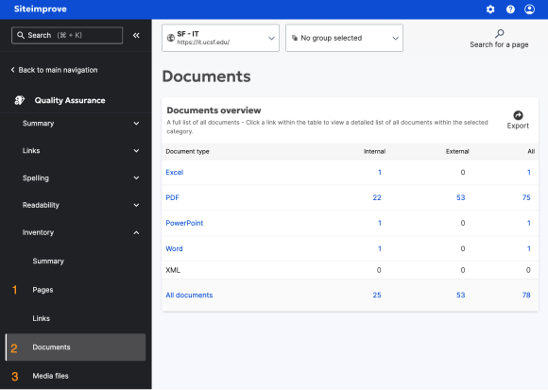
Note: Automated testing by Siteimprove will only catch only ~30-40% of accessibility issues. We recommend manual testing for high-profile websites.
Remediations
- I received an email with a ServiceNow ticket associated with my website saying that I am an owner of one of UCSF's most-visited websites and I need to achieve accessibility compliance by a certain date; what does that mean?
All IT website owners of high-volume, public-facing websites are responsible for achieving compliance by the internal deadline as indicated by the email.
- How do I remediate a website that I own?
- Remediate issues in Siteimprove until score ≥95, and videos and PDFs are compliant. See the Websites (Highest Risk) page for resources and instructions.
- If remediation isn't possible by the date indicated within the email, we will require a remediation plan to keep track of progress.
- Remediation plan example:
- We will have our site at 95% by November 15, 2025.
- We will have all our PDFs accessible by November 30, 2025.
We will have all our videos captioned by December 15, 2025.
- Remediation plan example:
- What happens if my website's Siteimprove Site Target score drops below 95%?
- Beginning August 5, 2026, the Digital Accessibility Compliance Program (DACP) will begin automated monitoring of website accessibility compliance.
- If your website's Siteimprove Site Target score remains below 95% for four consecutive weeks, a ServiceNow accessibility ticket will automatically be created. Email notifications will be sent to your website's Business Owner and Technical Contact. If the issue remains unresolved, escalation notifications will also be sent.
- Once your website's Site Target score returns to 95% or higher, the ServiceNow ticket will automatically close.
- To avoid receiving a notification, review your Siteimprove Site Target score regularly and address accessibility issues as they arise. Refer to the Website Accessibility page for step-by-step guidance.
Manual Testing
- How do I test accessibility of websites that aren’t public and web pages that require a login? Siteimprove can only scan public-facing websites. To test this content that requires a login, you need to perform manual testing.
- For sites that require a login, we recommend, single-page checkers, such as Siteimprove's or WAVE's browser extension tools. please combine these tools with manual testing.
Join us for one of our Live Sessions to learn more about these testing techniques.
- What is assistive technology, and how do I test with it? Assistive technology (AT) is a broad term for hardware and software that supports people with disabilities. One of the best ways to ensure your website works for everyone, regardless of ability, is to use it with one or more types of AT.
Website Inventory: ServiceNow
- Where did you get your information about website/application ownership and contact information? How do I update this information? UCSF IT uses ServiceNow to maintain our inventory of websites and applications.
- You can register and update website records in the UCSF Website Management tool. IT Staff: update your website record in CMDB.
If we have the wrong information about an application, please contact the IT Service Desk to request an update.
Website Accessibility Compliance Dashboard
What is the Enterprise Website Accessibility Compliance Dashboard, and how do I use it? The dashboard combines data from multiple sources to provide an overview of UCSF’s progress toward compliance over time. Detailed information and instructions for the dashboard are available.
Drupal 7 to Drupal 10 Migration: Lift and Shift
- Siteimprove has flagged accessibility issues within my Drupal 7 website, how do I fix these issues?
- We are actively working with our developers to resolve these issues in order of risk and impact. You are not responsible for remediating these specific template-related issues. As the fixes are remediated by the developers, you will see the Siteimprove issues disappear, and points will be gained with no action needed on your part.
- Importantly, these issues have minimal impact on your overall accessibility score.
- Drupal 10 Updates and release notes are linked from the Lift & Shift | Drupal 7-to-Drupal 10 Update Project webpage.
Vendor Access to Siteimprove
- How do I provide my vendor access to Siteimprove?
- Siteimprove requires the same UCSF credentials provided for MyAccess. Some site owners get affiliate status for their vendors so they have this access, but not all do that. If you wish to pursue that, your department's HR can help facilitate that request.
- Once your vendor has affiliate status with UCSF login credentials, have them log into Siteimprove via MyAccess and select the Siteimprove link. When that is done, please open up a ticket and the DACP team will associate your Siteimprove account with your website(s).
- Alternatives to vendor access for Siteimprove include Site owners sharing accessibility progress via Zoom screen-share sessions looking at live data together or exporting reports for the vendor.
Applications
- I am responsible for a vendor application. How do I ensure compliance? Follow our recommendations for the accessibility of vendor applications.
- My team developed an application. How do you recommend we check the accessibility of our application? Follow our recommendations for the accessibility of UCSF-developed applications.
- We use open-source software. What are our responsibilities for accessibility? The new federal accessibility rules also cover open-source software. It is your responsibility to select and use accessible software, even when we don't sign a contract or contribute code back to a project.
PDFs, PowerPoint, Word, Videos, and Course Content
- What are some common accessibility issues I should be aware of, so I can avoid them? Check our Common Accessibility Issues page for more information.
- What are the accessibility requirements for Word documents, PowerPoints and PDFs? We have a page explaining Word, PowerPoint, and PDF Accessibility.
- Why does Siteimprove suddenly flag files that were never flagged before? It’s important to note that Siteimprove regularly improves its PDF Testing and Remediation features. As a result, a PDF that shows no accessibility issues at one point in time may surface issues in a later scan. While this can be frustrating, it ultimately helps us continue improving the accessibility and quality of our PDFs over time.
- What are the accessibility requirements for video and audio? Check our Audio and Video Accessibility page for more information. These requirements apply universally to all videos used to "to engage with University programs and services" regardless of the language in which they are provided, including languages other than English.
- What should I do to make sure my emails are accessible? See our page on Email and Mass Mailings Accessibility.
- How do I test the accessibility of my course content? The Education IT team is procuring a robust accessibility checker called YuJa that will integrate with Moodle and Canvas to allow you to scan your courses' accessibility and, where needed, provide remediation instructions for improvement. In the meantime, you can leverage the TinyMCE editor in your Moodle courses to correct some common errors in the text. If you have any questions, please fill out the Education IT service request form.
- eCourse Accessibility Checklist from UCOP. Also available as a Word doc.
- For more EdTech how-to guides, including Canvas resources, visit the Ed-IT: EdTech How-to Guides page
Inventory
- Is there a spreadsheet to help track my department's inventory? Yes, download this Accessibility Tracking Template with Examples spreadsheet and make it your own.
Procurement
- Where can I find information on software purchasing guidance? You can find information about purchasing and procurement on the Software Purchasing Guidance page. We also have separate training information for procurement professionals and for people responsible for purchasing software.
Training and Getting Help
- Where can I find training about accessibility and tools? You can find recommended trainings on the Digital Accessibility Training page.
- I need help getting started with accessibility. The Digital Accessibility Training page is where you can
- Join our Live Help Sessions to ask questions, learn about tools and techniques, and learn from your peers.
- View our webpage listing Common Accessibility Issues.
- Submit a Digital Accessibility Consultation Request to ask for help from the team.
We recommend posting your question in the Digital Accessibility Community of Practice Teams channel.
- Is there a list of vendors that provide accessibility services? For vendors, visit the Accessibility Vendors page and How to Estimate Remediation Costs. More detailed information is available on the vendor services spreadsheet (requires MyAccess). This spreadsheet lists vendors for all kinds of accessibility services, including, but not limited to, training, testing, and remediation.
Law and Policy
- When do the new federal rules go into effect? The new federal rules go into effect April 27, 2027.
- Where can I read the full text of the new rules? See our page explaining the new ADA Rule.
- What is the policy on accessibility at UCSF? The University of California policy (UC) references federal laws that require our web-delivered services and content to be accessible to people with disabilities. UCSF is also legally bound to comply with related digital accessibility California state laws and regulations. UCSF will need to comply with WCAG AA by April 27, 2027.